

Screenie
Simple screen time, built on trust.
Help kids take charge of their screen time with a smart timer that syncs across all devices.
Get StartedWhat is Screenie?
Screenie™ is a smart timer that syncs with your family's screen time rules. Available as a parent app and a portable device for kids — no phone required.
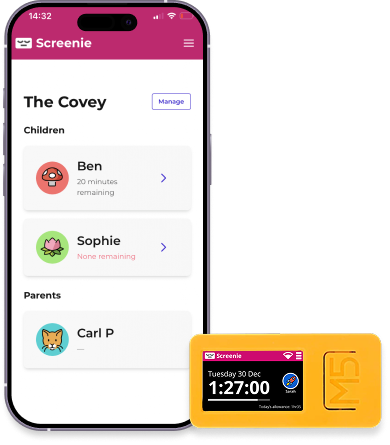
The smartest timer
Syncs with your weekly allowance, supports per-day settings, weekends, wake times, and bedtimes.
Push notifications
Kids can request extra time. You get notified instantly and approve with one tap.
Works everywhere
One timer for console, laptop, tablet, or phone. No more juggling settings across devices.
How It Works
A simple agreement: when the screen is on, the timer runs. When time's up, they come away.
Set Allowances
Define weekly screen time with custom rules for weekdays, weekends, and special occasions.
Kids Time Themselves
Simple push-button action. Start the timer when gaming, stop when done. That's it.
Stay Connected
Get notifications for time requests. Grant bonus time or check usage from anywhere.
Why Screenie?
Screenie focuses on measurement, not enforcement. Empower kids while keeping you in control.
Trust, Not Enforcement
Kids take ownership of their time. Build responsibility instead of resentment.
All Devices, One Timer
Console, tablet, phone, laptop — one unified allowance. No more device-hopping loopholes.
No Phone Required
Perfect for younger kids. The physical Screenie device works without needing a smartphone.
Better Wellbeing
Less screen time means better sleep, focus, and mental health for growing minds.
No App Whitelisting
Stop fiddling with settings to exclude educational apps. You trust the kids.
Parent Visibility
See when the timer runs. Add bonus time. Set minimum session lengths if needed.
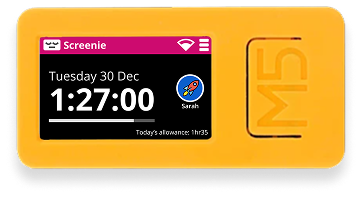
The Screenie Device
A portable, rechargeable timer that kids can take anywhere. No phone needed — perfect for younger children.
Common Questions
At the moment, the only way to get a Screenie is to buy an m5stick2 device and then copy the screenie firmware onto it. Full instructions are on the Screenie device blog here.
We are considering making a small batch of pre-flashed devices available for purchase in the future, but have no firm plans yet. If you'd be interested in buying one, please register your interest here.
Screenie was a holiday project by Carl Partridge, a software engineer and dad of two based in the UK. Frustrated by the lack of good options for managing his kids' screen time, he decided to build his own solution using affordable hardware and open-source software. You can read more about the origins of Screenie on his blog.
Set clear rules upfront — like reduced screen time if forgotten. Once it's a habit, this rarely happens!
No problem. You can grant bonus time through the app to make up for honest mistakes.
Not at all! The physical Screenie device works independently. The app is optional and for older kids.
Yes! Full flexibility for per-day settings, wake times, and bedtimes.
Absolutely - there is a full developer API and you can build your own smartphone or smartwatch app, local e-ink display of screentime, whatwever your imagination can come up with!
Let us know what you have built and we'd be happy to feature it on the site.
Ready to take control?
Join families who've found a better way to manage screen time — one built on trust, not conflict.